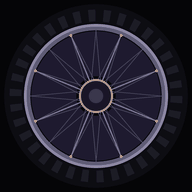
KontrollRad
A wheel you play. The hub is the root note, the eight spoke-bound sectors are the scale above it, and every part of the wheel does one job.
It carries an instrument of its own — the RadPan — and it can put the same gestures out over MIDI to drive other gear.
Tap a sector
Each wedge between the spokes is one note of the scale. The hub in the middle is the root.
Sweep across the spokes for a run.
Hold to sustain
Keep a finger down and the note latches and rings on instead of fading.
Flute, pad and bass stop when you let go. Handpan and piano ring on. The kit is one hit per tap: hub is the kick, the sectors are the rest.
Slide while holding
Away from the hub opens the filter. Around the arc adds resonance.
Every finger shapes its own note, independently. The drawing shows POLAR; tap that rim label for XY, where the same two controls follow the screen — up and down, left and right — instead of the wheel.
The tire is the effect send
Turn the rubber to set how much reverb everything sits in. It turns without moving the notes. FX, top left, picks the reverb, and can arm a tempo-locked delay that touches only what you are playing, never the loop underneath.
The short arc on the left of the tire is vibrato depth.
Drag the valve stem
The small brass stub on the rim turns the note ring. Put the low notes where your hand wants them.
Set once for a piece, then leave it.
Tap the rim labels
Instrument, scale, key, and whether the slide axes follow the wheel (POLAR) or the screen (XY).
Tap anywhere on the tire behind a label, not just the letters.
Or drive real gear
The same wheel, sending MIDI instead of playing the RadPan. Sectors send notes, the slide sends cutoff and resonance, the tire sends whatever you map it to.
Patches for SEQTRAK and Woovebox. The Woovebox needs nothing extra; a SEQTRAK needs a BLE-MIDI dongle. Android only. FX shows what each gesture sends to the machine; any of them can be set to nothing.
Build your own sound
Tap the instrument label on the rim, then Make a sound of your own. Three oscillators, an envelope, a filter and one moving part — enough to get a long way from the factory sounds.
The drawing shows the wave change as you move a slider. Saved patches sit on the wheel beside the instruments and stay in this browser. Copy code turns a patch into text you can send to anyone. Hold a patch in the list to edit it.
Save a loop, or take it with you
SONGS saves the loop you have built — every layer, its faders, tempo and grid — so a piece survives the session.
MIDI file writes a real .mid with one track per layer, ready for a DAW or a groovebox. Tag it RADPAN, WOOVEBOX or SEQTRAK and the channels are laid out the way that machine expects them.